← All guides
Refining your SmartPreset
Refine your SmartPreset
Give Neurapix feedback and sharpen your look step by step.
ongoing
Step 01 — Adjust & select images
Touch up the AI edit in Lightroom wherever it doesn’t match your taste yet. Then select all images of that event.
Step 02 — Open the refinement
Go to Library → Plug-in Extras → Send corrections.
Step 03 — Send your feedback
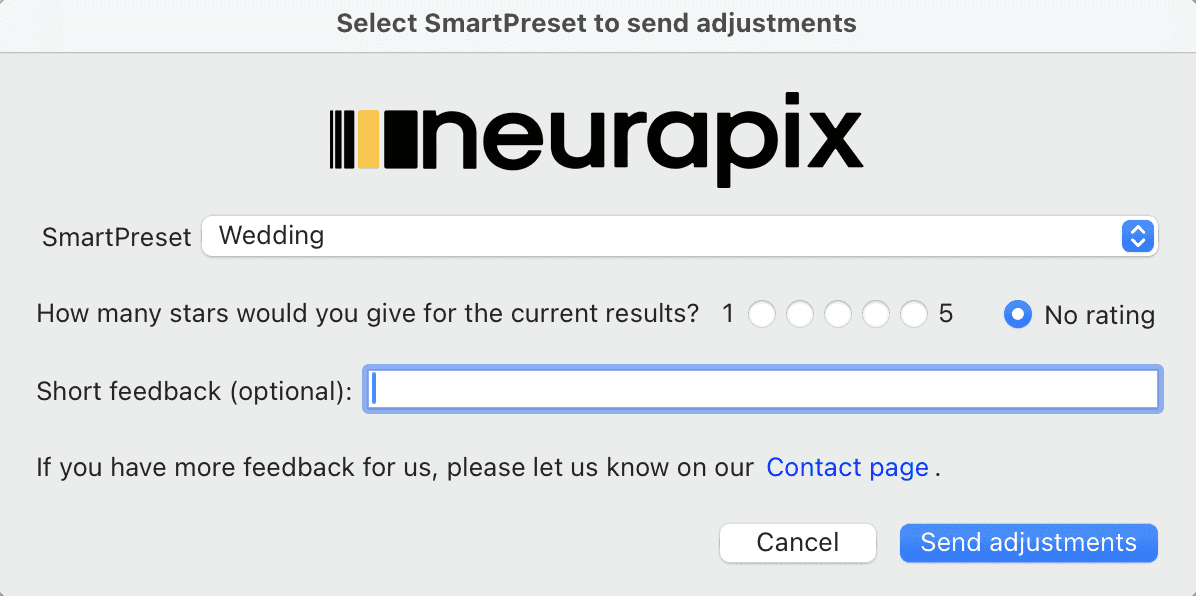
In the dialog, choose your SmartPreset. Optionally rate the current edit with 1–5 stars or add a short comment.
Then click “Send adjustments”.
Step 04 — Check your progress
In the Neurapix dashboard under “Your SmartPresets” you can always see how many edited images are left until the next training.
Step 05 — Get notified
Once enough images are reached, the AI automatically optimizes your SmartPreset. You’ll be notified by email as soon as the refined version is ready to go in Lightroom.
Your SmartPreset keeps learning.
With every round of feedback, your look gets closer to 100%.
Everything at a glance


Start with 1,000 free AI edits.
Copyright © 2026 Neurapix GmbH. All rights reserved.